
Keywords Everywhere has long been a popular browser extension for quick keyword research, especially because its search volume and CPC data used to be free. But after moving to a paid model, many users began looking for a Keywords Everywhere alternative, ideally something free, simple to use, or offering more features than a basic Chrome extension.
If you’re searching for tools like Keywords Everywhere or want a free option with similar functionality, this guide breaks down the best alternatives. And if you’re ready to go beyond snapshots and actually track keyword performance over time, the last tool on this list may be exactly what you need.
TL;DR: The Best Keywords Everywhere Alternatives
-
Keyword Surfer: free Chrome extension showing search volume, CPC, and keyword ideas.
-
Ubersuggest: browser extension with related searches, SERP metrics, and content suggestions.
-
LiveKeyword: free Chrome extension with related searches + CSV export.
-
Keyword.com: full-featured keyword tracker with trends, history, competitors, and SERP intelligence.
Let’s take a more in-depth look at these tools to see which comes out on top.
1. Keyword Surfer
Keyword Surfer is a Chrome extension developed by Surfer.
Similar to Keywords Everywhere, you need to type in the targeted keyword in the search bar to attain its data.
You’ll then see your keyword’s search volume and CPC on the search bar.
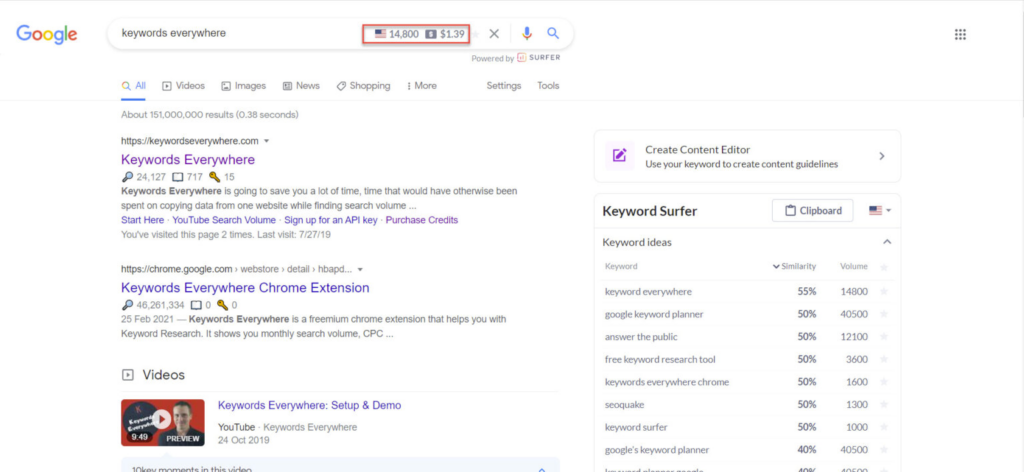
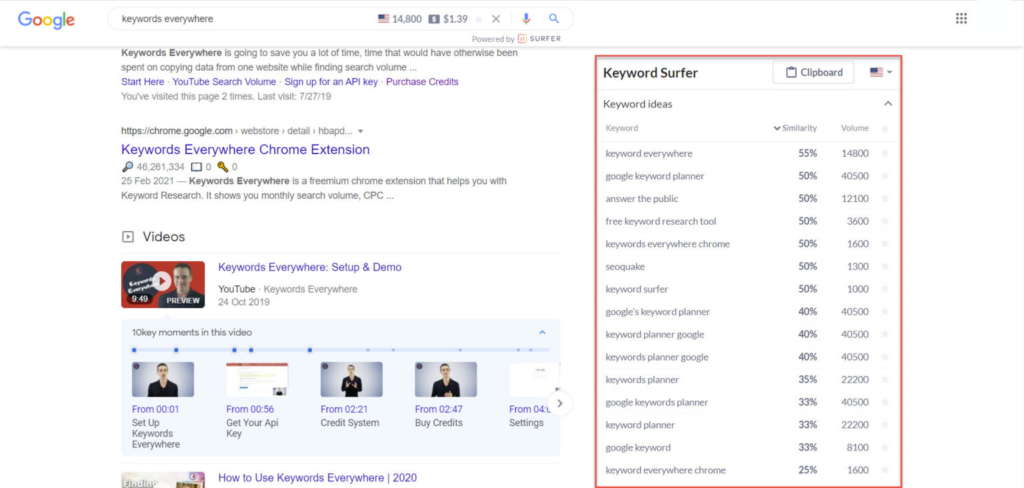
On the right side of the SERPs, you’ll see terms related to your searched keywords. If you’re looking for other keyword variations or alternatives, we recommend selecting those with the highest similarity percentage to keep the direct relevance.
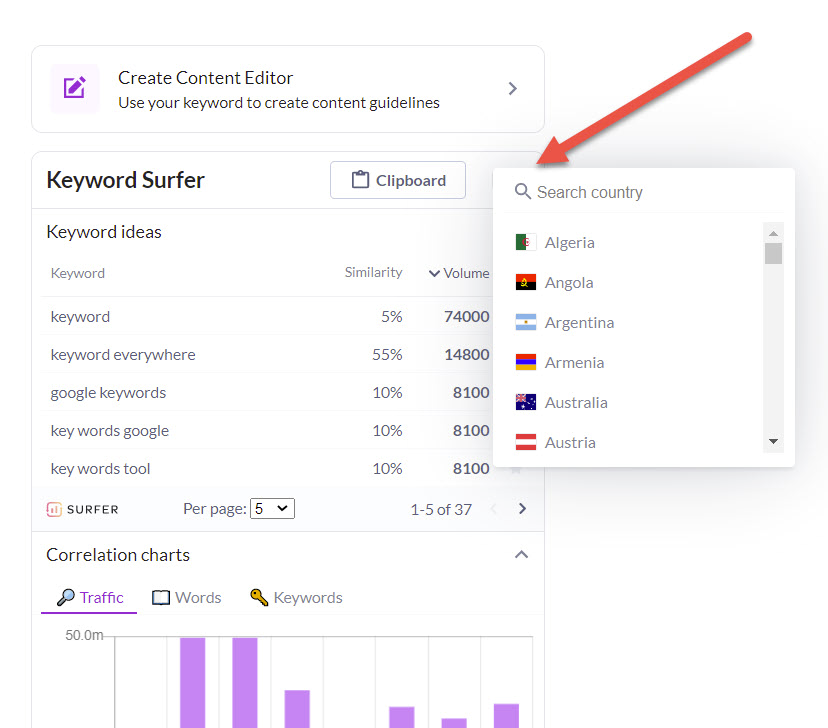
You can also gather search volume data for a specific location on Keyword Surfer. To do this, click on the flag icon at the top right corner and choose your target location.
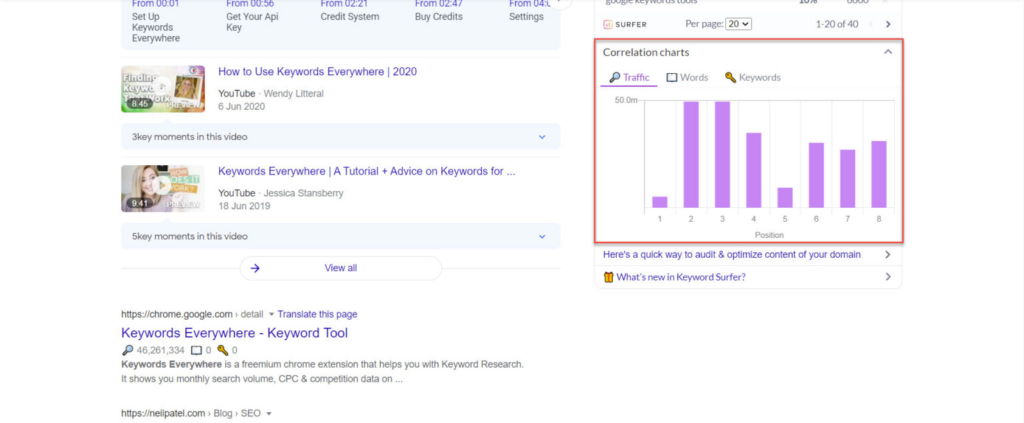
Unfortunately, Keyword Surfer doesn’t provide keyword difficulty score data. However, it still provides you with these three meaningful metrics (from left to right):
- Traffic: domain’s estimated monthly traffic
- Word Count: number of words on the page
- Keywords: number of times a search term appears on the page
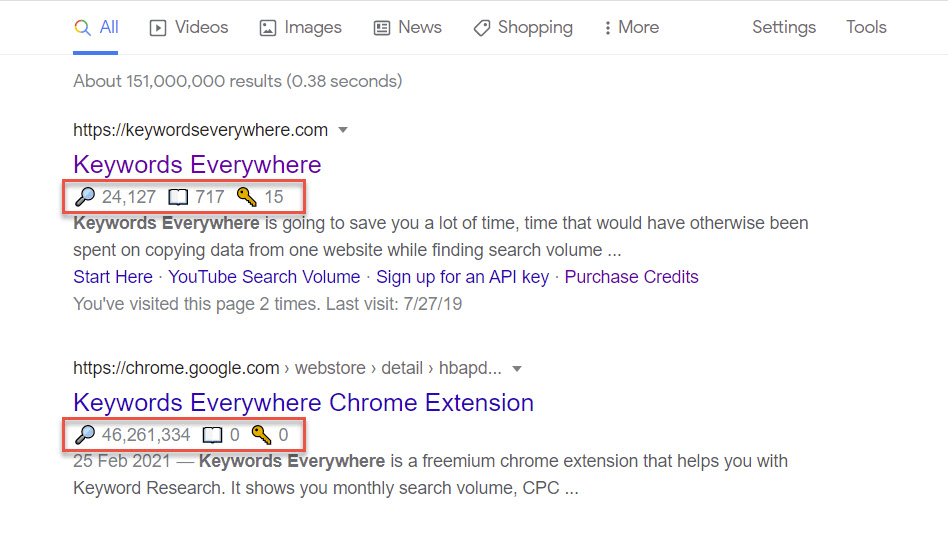
Using these metrics, you can determine whether it’s worth the effort to try ranking for the targeted keyword. For instance, if the top-ranking pages on Google have low traffic with a low number of keywords appearing in the content, this could mean that the keyword isn’t highly competitive, and you may have a high chance to rank for this term.
Regarding word count, use this as a basis for writing your content. Ideally, your content length should be similar to the average word count of all the results on the first page of the SERPs.
As for the Correlation Charts section (the bar graphs below the Keyword Ideas section), this will give you in-depth information about the ranks of the pages that contain the searched keywords. You can see the data based on traffic, word count, and keyword metrics.
2. Ubersuggest
Owned by Neil Patel, Ubersuggest is a handy keyword tool that lets you research your competitors, unearth keyword ideas, analyze backlink profiles, and more.
To start using Ubersuggest, simply install it as a browser extension.
After the installation, search for a keyword on Google. The results will be presented similarly to what appears on Keyword Surfer.
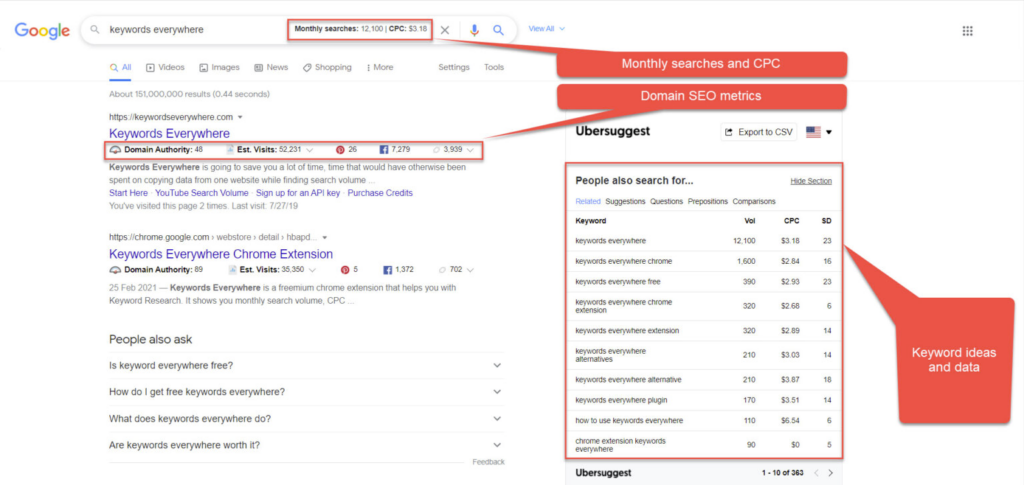
That being said, Ubersuggest offers two extra features than Keyword Surfer.
First, under the “People also search for…” section, it shows the “Related” keywords tab. The “Related” tab here lists other words relevant to the keyword you are searching for.
If you need more inspiration to expand your keyword research, check the “Suggestions”, “Questions”, “Prepositions”, and “Comparisons” tabs.

Keep in mind that you have a maximum of 3 free searches available per day for a free account. If you need more searches, you’ve to subscribe to Ubersuggest.
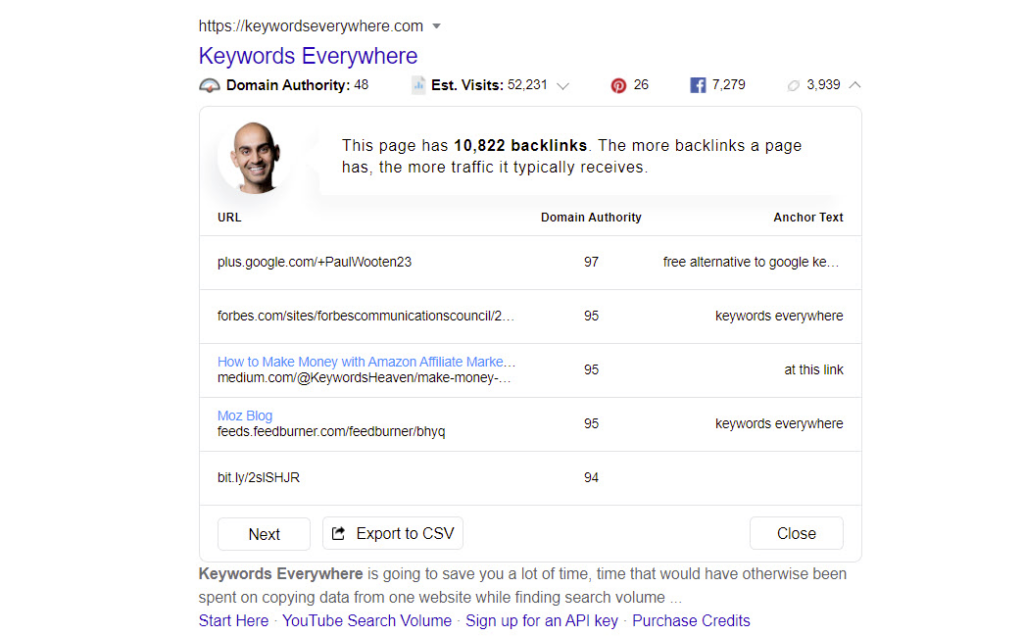
Second, under each search result on the SERPs, you can find several SEO metrics, such as domain authority, number of visits (estimated), number of social shares, and number of backlinks. You just need to click on the drop-down arrow next to each metrics to see the details.
Related:
Leading keyword tracking tools for your business
How to Set Up Keyword Tracking
3. LiveKeyword
From the makers of BiQ, LiveKeyword is a free keyword research utility, almost similar to Keywords Everywhere in nearly every aspect.
You must first sign up for a BiQ account when downloading the free Chrome extension to get its API Key.
From there, type your search query into Google.
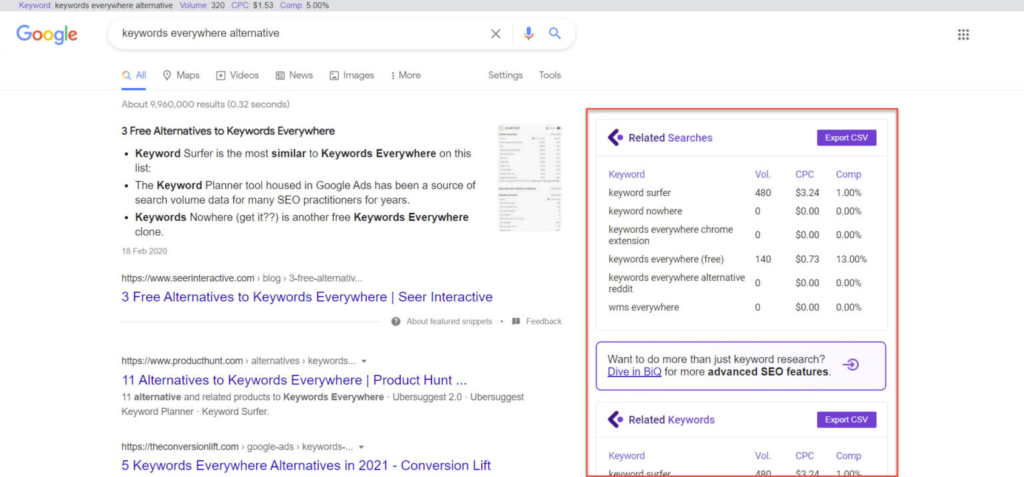
On top of the search bar, you will see the search volume and CPC of the searched term.
On the right side of the page, LiveKeyword shows you two groups of keyword suggestions: “Related Searches” and “Related Keywords”.
The former refers to terms that strongly correlate with the keyword you are searching for. You can see these keywords if you scroll to the bottom of the Google search or click on the search bar to show related search terms.
The latter is the keyword combinations many users typed in on Google while googling for their searched keyword.
You can download the keyword data from LiveKeyword by exporting it to a CSV file.
4. Keyword.com
In comparison to other Keyword Everywhere alternatives, Keyword.com stands out from the rest.
First, Keyword.com is a software-based SEO tool, not a browser extension.
Second, Keyword.com is equipped with an excellent keyword-tracking feature.
Keyword.com allows you to monitor the rank of your selected keywords from one day ago to all time. This information can significantly improve your content game as you’re now informed which keywords are worth pursuing based on their trends. For instance, if you’re looking for:
- An evergreen topic, pick a keyword that constantly ranks high, or
- An up-and-coming topic, find keywords whose ranks are gradually increasing.
You can add the list of keywords manually or let us help you complete the list of potential keywords related to your term with our smart algorithm.
Let’s say you want to create content about the World Cup 2022. So, you want to track the popular keywords related to the World Cup 2022 from fifa.com. On Keyword.com, choose “fifa.com” as the targeted URL, type in “World Cup 2022” to the “Keywords to Track” list, and add it along with other suggested keywords (right pane) to the list.
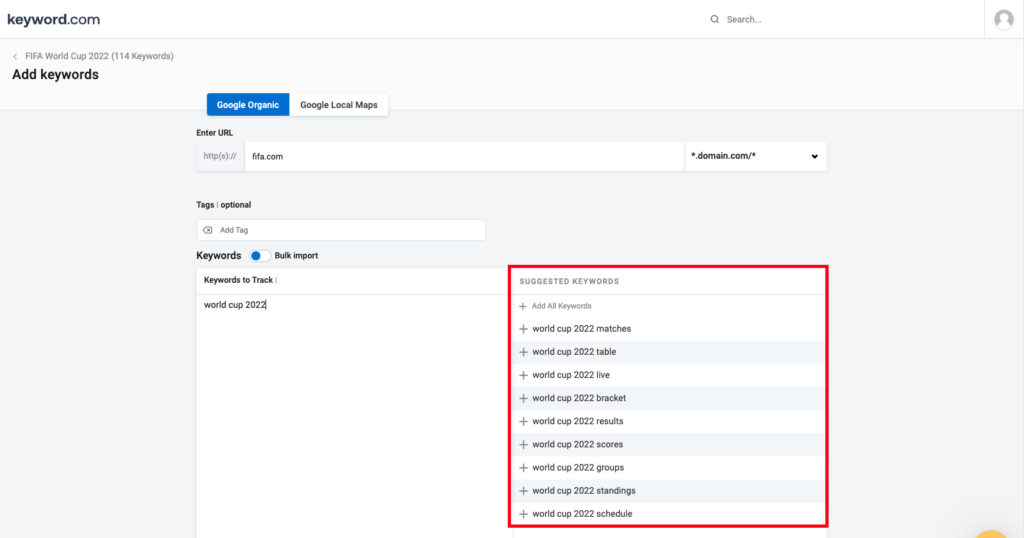
Once you’re happy with your selection, let Keyword.com fetch the results.
Now we have 114 “World Cup 2022” related keywords being researched and monitored from fifa.com.
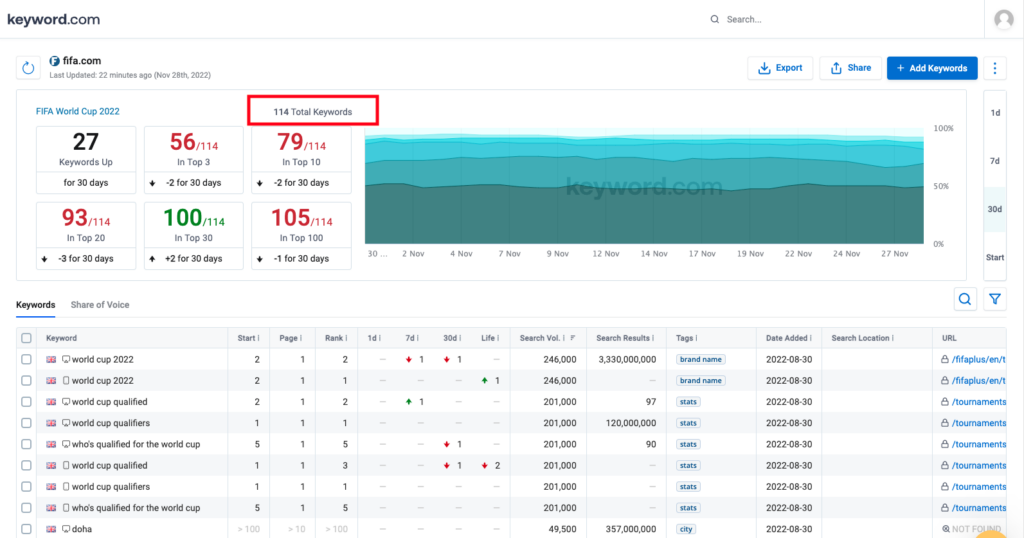
From the screenshot below, we can see that the rank for the “FIFA world cup score 2022” is increasing every day—hinting that this is an excellent time to create content using “FIFA world cup score 2022” as the main keyword.
Using factual data, such as the one from Keyword.com, will ensure that your SEO strategies won’t go to waste.
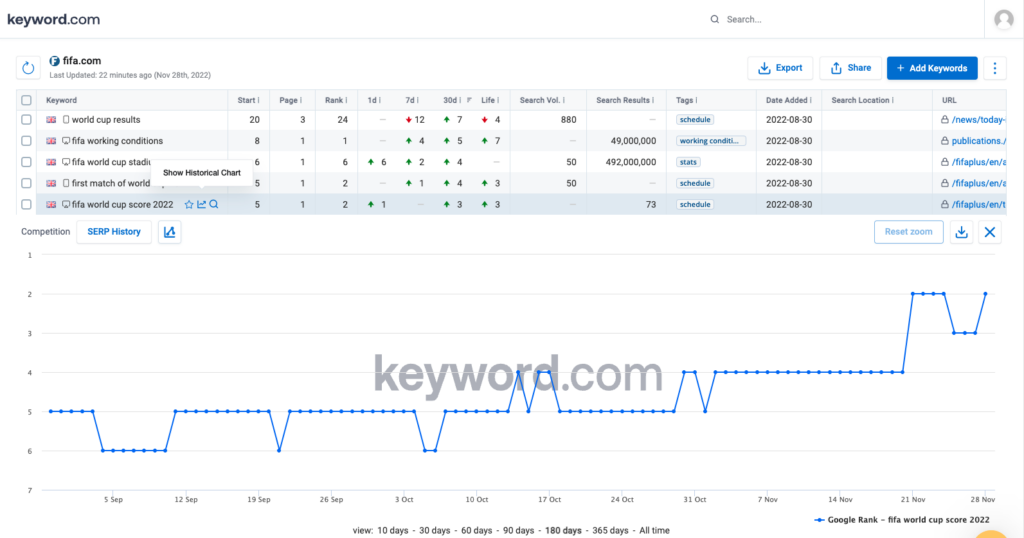
Unlike browser extensions like Keywords Everywhere or Keyword Surfer, Keyword.com is designed for long-term keyword tracking. If you’re specifically comparing Keywords Everywhere vs. a full tracking tool, Keyword.com gives you historical trends, competitor insights, and daily movement; features browser extensions can’t provide.
Which Keyword Tracking Tool Should You Use?
Each of the tools above is a solid Keywords Everywhere alternative, especially if you only need quick keyword checks or free Chrome extensions. But if you want to go beyond snapshots and build SEO strategies on reliable, recorded data, you’ll need a tool that tracks rankings over time and reveals real opportunities.
That’s where Keyword.com stands out. Features like Rank History, Share of Voice, and daily SERP updates give you a clear view of how keywords move, which competitors are gaining ground, and where new content opportunities are emerging.
Try Keyword.com free for 14 days and compare it against any Keywords Everywhere alternative: see which keywords move, track competitors, and uncover new rankings.
FAQs About Keywords Everywhere Alternatives
1. What Are the Best Free Keywords Everywhere Alternatives?
The best free alternatives to Keywords Everywhere are Keyword Surfer, LiveKeyword, and the limited free tier of Ubersuggest. Each one provides quick keyword metrics like search volume, CPC, and related terms directly in your browser. For SEOs who want more than snapshots, such as daily rank tracking and historical trends, Keyword.com is the next step once free extensions reach their limits.
2. Why Do People Look for a Keywords Everywhere Alternative?
People search for “Keywords Everywhere alternative” for a few reasons:
-
They want a free tool (Keywords Everywhere is a paid tool).
-
They want more data types than search volume/CPC.
-
They need keyword tracking, not just snapshots.
-
They want a Chrome extension alternative.
3. Is There a Keywords Everywhere Alternative With AI Features?
Yes. If you want a Keywords Everywhere alternative that supports AI-powered search analysis, Keyword.com includes AI Overview tracking and AI Rank Tracking. These features show when AI-generated results appear for your keywords, whether your pages are cited, and how often AI summaries show in SERPs. While Chrome extensions only provide snapshot keyword data, Keyword.com helps you monitor how AI search impacts visibility and which keywords gain or lose momentum over time.
4. Does Keywords Everywhere Have a Free API Key?
No, Keywords Everywhere no longer provides a free API key. If you want free Chrome-based keyword data without API setup, Keyword Surfer and LiveKeyword are your closest matches.
5. Which Keywords Everywhere Alternative is Best for Tracking Rankings Over Time?
For keyword tracking, Keyword.com is the strongest competitor to Keywords Everywhere. It shows daily ranking movements, historical trends, competitor visibility, and SERP insights, none of which browser extensions offer. This makes it the top alternative for anyone managing SEO strategically rather than casually researching keywords.